Value
The display of the elementary block Value corresponds exactly to the block Text. Except that instead of a static text, the value of the Lettering parameter is displayed - formatted according to the configuration.
CSS Classes
- dashboardFormatControl: an HTML element (DIV) with this CSS class is created for the elementary module itself.
- dashboardFormatControlText: the actual text is in an inner HTML element (DIV) - the element receives this CSS class.
CSS variables
- --dashboard-format-control-padding, default 0.5em: the indentation (CSS padding) of the text within the display area of the elementary module. If this variable is not set but --dashboard-control-padding, this value is used instead of the default.
- --dashboard-format-control-text-foreground, default #000000: the color (CSS color) of the text. If this variable is not set but --dashboard-control-text-foreground, this value is used instead of the default.
- --dashboard-format-control-text-background, default transparent: the background (CSS background, not just the color background-color) of the text. If this variable is not set but --dashboard-control-text-background, this value is used instead of the default.
- --dashboard-format-control-text-align, default center: the positioning of the text within the building block (CSS text-align), if this requires less space than that entire width - texts that are too long are always cropped (CSS overflow:hidden, text-overflow:ellipsis, white-space:nowrap). If this variable is not set but --dashboard-control-text-align, this value is used instead of the default.
Output Boolean value as text
Here you can work with a tenary operator:
v?"true":"false"
The quotation marks " and ' can be used interchangeably
Example:
binding1 contains a Boolean variable, if this is true, the string is output "active", otherwise "inactive"
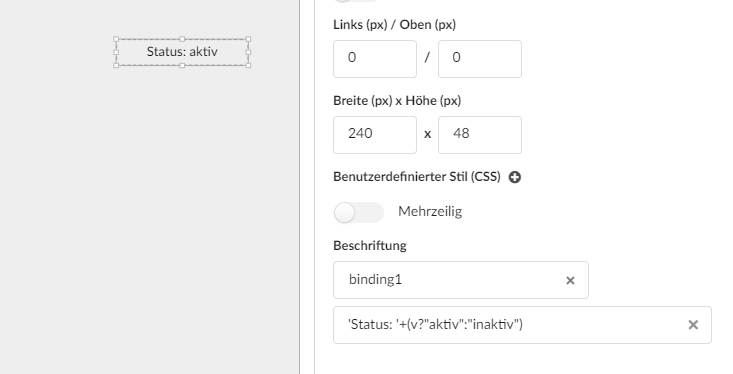
Converting values to display as a value on the dashboard
Current value in percent with respect to a variable from a fader
v+'%'
Example for Symetrix:
Value range 0-65535 (fader) for display convert to -72.0 to +12.0dB (56200 corresponds to ~0dB)
- min = 0
- max = 65536
- dbMin = -72
- dbMax = 12
Formula for the display element:
Math.round((v - min) / (max - min) * (dbMax - dbMin) + dbMin) + "dB"
Specifically using example 1:
Math.round((v - 0) / (65535 - 0) * (12 - -72) + -72) + "dB"
or shortened
Math.round(v / 65535 * 84 - 72) + "dB"
v = 0 => -72dB
v = 65535 => 12dB
v = 56200 => 0dB
Specifically using example 2:
Math.round((v - 0) / (65535 - 0) * (15 - -45) + -45) + "dB"
or shortened
Math.round(v / 65535 * 60 - 45) + "dB"
v = 0 => -45dB
v = 65535 => 15dB
v = 49200 => 0dB
Formula for Hz
Math.ceil(Math.pow(10, (v / 65535 * 30 - 15) / 9) * 430.886938) + "Hz"
Formula for "Q"
Math.round(1000 * (Math.pow(10, (v / 65535 * 34 - 17) / 10) * 0.997631157)) / 1000