Tab Variables
In the Variables tab, (global) variables can be created and managed overall. These global variables are available throughout NeuroomNet and are one of the most important interfaces between different modules and parts of modules.
An example would be an integer variable Volume, which should represent the current volume value of an audio output device in NeuroomNet. This volume value could then be displayed and also changed in a slider in a dashboard, for example. Changes to the variable value via the slider could then trigger a Variable Changed trigger in the Script Blocks module to send the updated volume value to the audio output device.
Note: There is also a "Variables" tab in the Script Blocks. That tab deals with the same variables, however these two tabs are currently (as of NeuroomNet 2023.3) technically different for historical reasons (different and largely redundant software code bases) and have slightly different functionalities.
User Interface Overview
The user interface is divided into two parts:
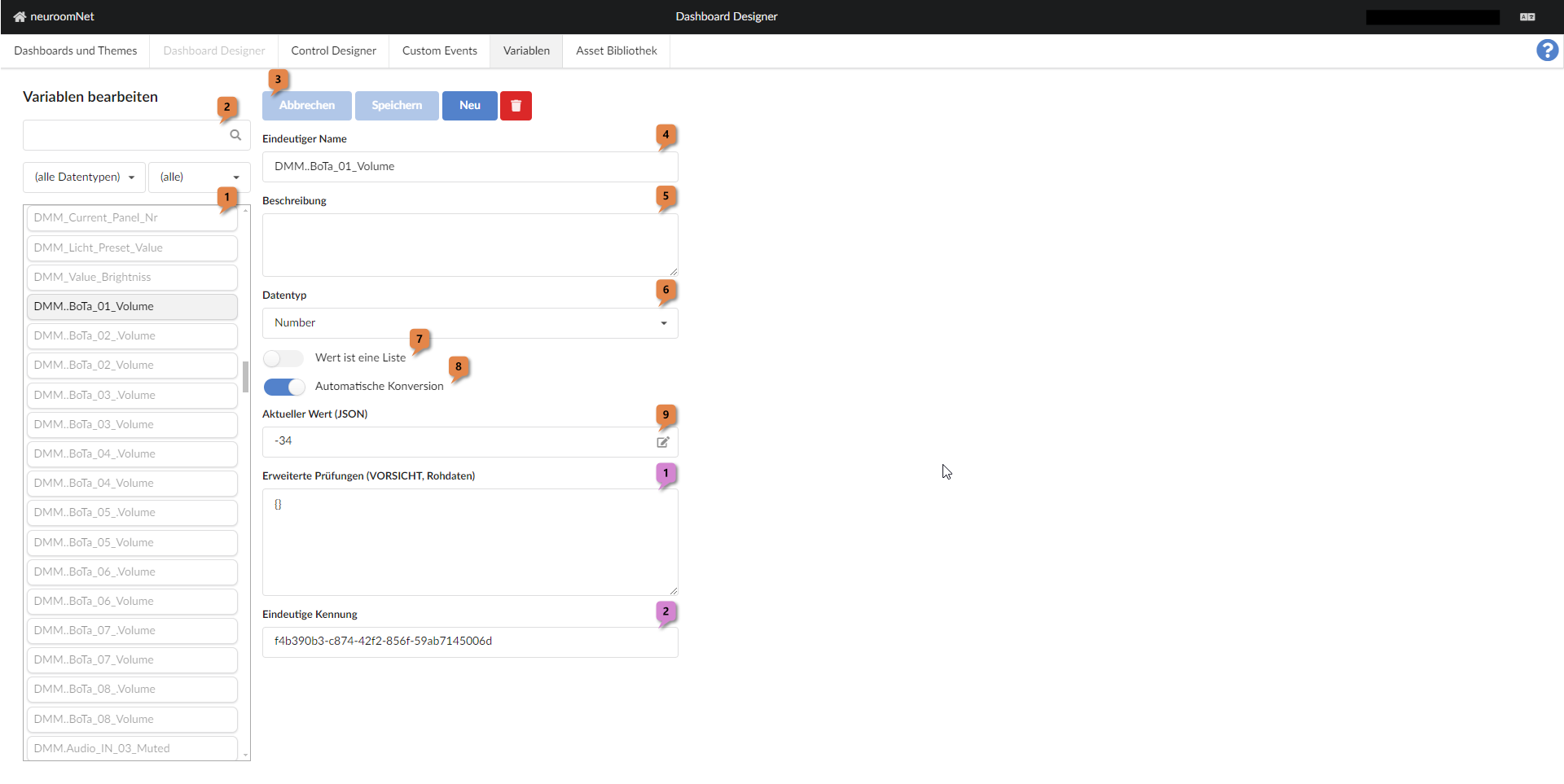
In the left part, existing variables can be selected 1 (and filtered 2).
In the right part, the main properties of the currently selected variable are displayed and can be edited there:
- Using the button bar 3 the following can be done:
- Buttons "Cancel" and "Save": Undo or save changes made to the currently selected variable since the last save
- Button "New": Create a new variable
- Trash bin button: Delete the currently selected variable
- Field "Unique Name" 4: Unique name of the variable
- Field "Description" 5: (Optional) description of the variable
- Field "Data type" 6: Data type of the variable
- Field "Value is a list" 7: Here it can be specified whether the data type / variable should be a single value or a list / array of values (of the specified data type)
- Field "Automatic conversion" 8: If selected, values of the variable are automatically converted to other data types if operations in script blocks or dashboards require different data types. See Sub-chapter Type conversion in the Script Blocks module]
- Field "Current value (JSON)" 9: Here the current value of the variable is specified in JSON / JavaScript format. For a
Numberthis would be e.g.1002, forTexte.g."Hello World"(with quotation marks) and for aListwithNumberdata type e.g.[1,2,3,4,5]. - Field "Advanced checks (CAUTION, raw data)" 1: To follow.
- Field "Unique identifier" 1: Technical ID of the variable. This is automatically generated and is generally only relevant for NeuroomNet software developers (e.g. technical log files could be examined using this ID).