Overview of all component providers
As a kind of reference and explanation for the providers available in NeuroomNet, all providers currently available in NeuroomNet are listed in the following subsections with their setting options and explanations. In particular, the following important information is provided:
- Classification: Classification of the provider into active and passive:
- Active providers (components): Active providers correspond to active components, i.e. components that contact the NeuroomNet server on their own. After the first such contact, NeuroomNet places the component in the setup module (e.g. based on the MAC address of the component, which can be used to automatically recognize this component in the future, even if the IP address has now changed).
- Passive providers (components): Passive providers correspond to passive components, i.e. which are usually created manually in the Setup module of the NeuroomNet server including contact information (such as the IP address of the component). The corresponding components usually do not connect independently to the NeuroomNet server.
- Network / Communication: Describes how the provider's components can be configured in NeuroomNet with regard to accessibility in the network (especially affects passive components, because NeuroomNet needs to know how to reach the respective components).
- Actions: List of all provider-specific (NeuroomNet) actions. The standard actions that each component has ("Enforce Warning Level" and "Reset Warning Level") are not included in this listing.
- Events: List of all provider-specific (NeuroomNet) events. The standard event that every component has ("State has changed") is not included in this list.
Provider Heatmap (formerly Camera)
With Provider Heatmap (formerly Camera), (hardware) cameras from the manufacturer Xovis are addressed via a proprietary protocol for counting incoming and outgoing people at entrances/exits.
- Classification: Passive
- Network / Communication: IP address
- Actions: Reset Counters
- Events: None; The cameras are currently only addressed (and polled) by the heatmap module in a proprietary manner.
Provider Digital Signage Player
The Provider Digital Signage Player addresses software digital signage players from NeuroomNet, each of which is installed on a computer (Windows, Linux, Android) in the network. Communication takes place via a proprietary protocol from NeuroomNet. More detailed documentation: Module Digital Signage
- Classification: Active
- Network / Communication: -
- Actions:
- Activate playlist
- Activate schedule
- Change display parameters
- End blackout
- Refresh schedule
- Start blackout
- Events: Request to switch signage input source
Provider DMX
Provider DMX addresses DMX devices that can be controlled via ArtNet or DMX.
- Classification: Passive
- Network / Communication: IP address
- Actions:
- WriteChannel
- WriteChannels
- Events: -
Provider email server
The email server provider connects to SMTP relay servers to send emails automatically from NeuroomNet scripts.
- Classification: Passive
- Network / Communication:
- Server URI: Hostname or IP address of the SMTP relay server
- Port: SMTP port — default: 587 for STARTTLS, 465 for direct SSL/TLS
- SSL/TLS: Direct SSL/TLS connection (port 465). If not enabled, STARTTLS is used (port 587).
- Ignore certificate errors: Accepts invalid or self-signed certificates — Warning: insecure, for testing only!
- Credentials: Name of a secret entry configured in the server configuration (username + password)
- Actions:
- Send an email — Parameters:
- From (
from): Sender address - To (
to): Recipient addresses, comma-separated - Subject (
subject): Email subject - Body (
body): Email text
- From (
- Send an email — Parameters:
- Events:
- E-Mail sent — fired after a successful send. No parameters.
- Send failed — fired when sending fails. Parameters:
errorMessage: Error message from the mail server or network layererrorType: Error type —"auth"for authentication failures,"timeout"for connection timeouts,"network"for other network errors
Credentials (username and password) are not stored directly in the component. Instead, they are stored as named entries in the server configuration (config.email.json, section secrets). The component field "Credentials" references the name of such an entry.
For installations using a custom CA certificate (corporate PKI), the path to the CA certificate file can be specified in the server configuration under tls.caFile. This allows certificate validation to remain active without having to fall back to the insecure "Ignore certificate errors" option.
Provider Exhibit
Provider Exhibit addresses exhibit software on (usually exhibit) PCs that can be remotely controlled using NeuroomNet's exhibit API (instead of or in addition to control using the provider/software PC client). |.
- Classification: Active
- Network / Communication: VendorId (= unique identification of the exhibit)
- Actions:
- Log users on or off
- Reboot the computer
- Restart the Exhibit Software
- Shut down the computer
- Events:
- Animation for RFID readers
- Day of Birth changed
- New gender selected
- Preferred User Language changed
- Status report
Provider KNX
With Provider KNX, (hardware) devices (sockets or lights) are addressed via the KNX protocol.
- Classification: Passive
- Network / Communication:
- Name of the component
- KNX/IP interface / gateway (IP)
- KNX address
- Data point type
- Actions:
- Send Data to Actor
- Events:
- Data received from sensor
Provider Master Link
With Provider Master Link, isMasters are addressed via a proprietary interface from inSynergie.
- Classification: Passive
- Network / Communication: Proxy address (= URL of the isMaster)
- Actions:
- [User defined in isMaster Administration and isMaster]
- Events:
- [User defined in isMaster Administration and isMaster]
Provider Network
With Provider Network, any device that can be controlled via TCP, UDP or Telnet and through character or byte sequences (via PRT) can be addressed.
- Classification: Passive
- Network / Communication:
- IP address
- TCP, UDP or Telnet
- Translation rule set (PRT)
- ID (not currently used; a unique character string should be entered here for possible future use)
- Actions:
- [as defined in the PRT]
- Events:
- [as defined in the PRT]
Provider PC client
With Provider PC Client, PCs on which the PC Client software from NeuroomNet is installed are addressed.
- Classification: Active
- Network / Communication: MAC address
- Actions:
- Reboot
- Wake On LAN
- Disable all serial ports
- Enable all serial ports
- Power off
- [and much more]
- Events: -
Provider PJLINK
With provider PJLINK, video projectors or screens are addressed via the PJLINK protocol.
- Classification: Passive
- Network / Communication: IP address
- Actions:
- Choose input
- Get lamp hours
- Get error state
- Power off
- Power On
- Set mute
- Events:
- Current input line
- Error states
- Lamp hour information
- Mute state
- Power status
Provider RFID reader
With Provider RFID Reader, (hardware) RFID readers IS-CC-RFID-2.0 from inSynergie are addressed via a proprietary protocol.
More detailed documentation: https://neuroom.net/rfid/
- Classification: Active
- Network / Communication: Mac address
- Actions:
- Active attraction
- Deactivate Attraction
- IDLE animation
- Switch all LEDs off
- Reboot and update to latest firmware
- Restart RFID unit
- Events:
- RFID detected
- RFID input changed
- RFID lost
Provider Serial
Provider Serial addresses devices that are connected via RS-232 cable to a PC configured using an IP address and can be controlled via character or byte sequences (via PRT).
- Classification: Passive
- Network / Communication:
- IP address
- Translation rule set (PRT)
- ID (not currently used; a unique character string should be entered here for possible future use)
- Actions:
- [as defined in the PRT]
- Events:
- [as defined in the PRT]
Provider SNMP
Provider SNMP addresses devices that can be controlled via an IP address using the SNMP protocol.
-
Classification: Passive
-
Network / Communication: IP address
-
Actions:
-
[as defined in the PRT]
-
-
Events:
-
[as defined in the PRT]
-
Provider HTTP
With Provider HTTP, any device or web endpoint that can be controlled or queried via HTTP or HTTPS requests (GET, POST, PUT, DELETE) can be addressed.
Unlike Provider Network and Serial, the messages to be sent are not defined via device protocols (PRT) but are passed directly as action parameters (method, endpoint, body). Alternatively, actions can be pre-defined as aliases in a component type: create a component type in the Component types tab and define the desired alias variants there for the "Send Request" action. These aliases can then be conveniently called as actions in script blocks.
- Classification: Passive
- Network / Communication:
- Server name or IP address: Hostname or IP address, optionally with port — e.g.
192.168.1.1:8080orapi.example.com:443 - Use HTTPS/SSL: Enables HTTPS for all requests from this component
- Ignore certificate errors: Accepts invalid or self-signed certificates — Warning: insecure, for testing only!
- Default HTTP headers (JSON): Optional default HTTP headers as a JSON object, sent automatically with every request from this component, e.g.
{"Authorization": "Bearer myToken"}
- Server name or IP address: Hostname or IP address, optionally with port — e.g.
- Actions:
- Send request — Parameters:
- Method (
method):GET,POST,PUT, orDELETE - Endpoint (
endPoint): Optional relative path appended to the server address - SSL override (
ssl): Overrides the component's SSL setting for this individual request - Header override (
headers): Additional HTTP headers as a JSON object; merged with the component's default headers - Content-Type (
contentType): For POST/PUT requests; default:application/x-www-form-urlencoded - Content (
content): For POST/PUT requests: the body text to send
- Method (
- Send request — Parameters:
- Events:
- Response received — fired after every HTTP response, regardless of status code. Parameters:
statusCode: HTTP status code (e.g. 200, 404, 500)body: Response body as a UTF-8 stringheaders: All response headers as a JSON object
- Request failed — fired when a connection error prevents any HTTP response from being received. Parameters:
errorMessage: Error messageerrorType: Error type —"timeout","ssl", or"network"
- Response received — fired after every HTTP response, regardless of status code. Parameters:
Note on the distinction between events: HTTP error responses such as 404 or 500 are valid HTTP responses and trigger the Response received event (not Request failed). The Request failed event is only triggered by real connection problems where no HTTP response is received at all — for example, the host is unreachable, the SSL handshake failed, or a timeout occurred.
The following is an example of defining actions for a component with Provider HTTP using an associated component type and aliases:
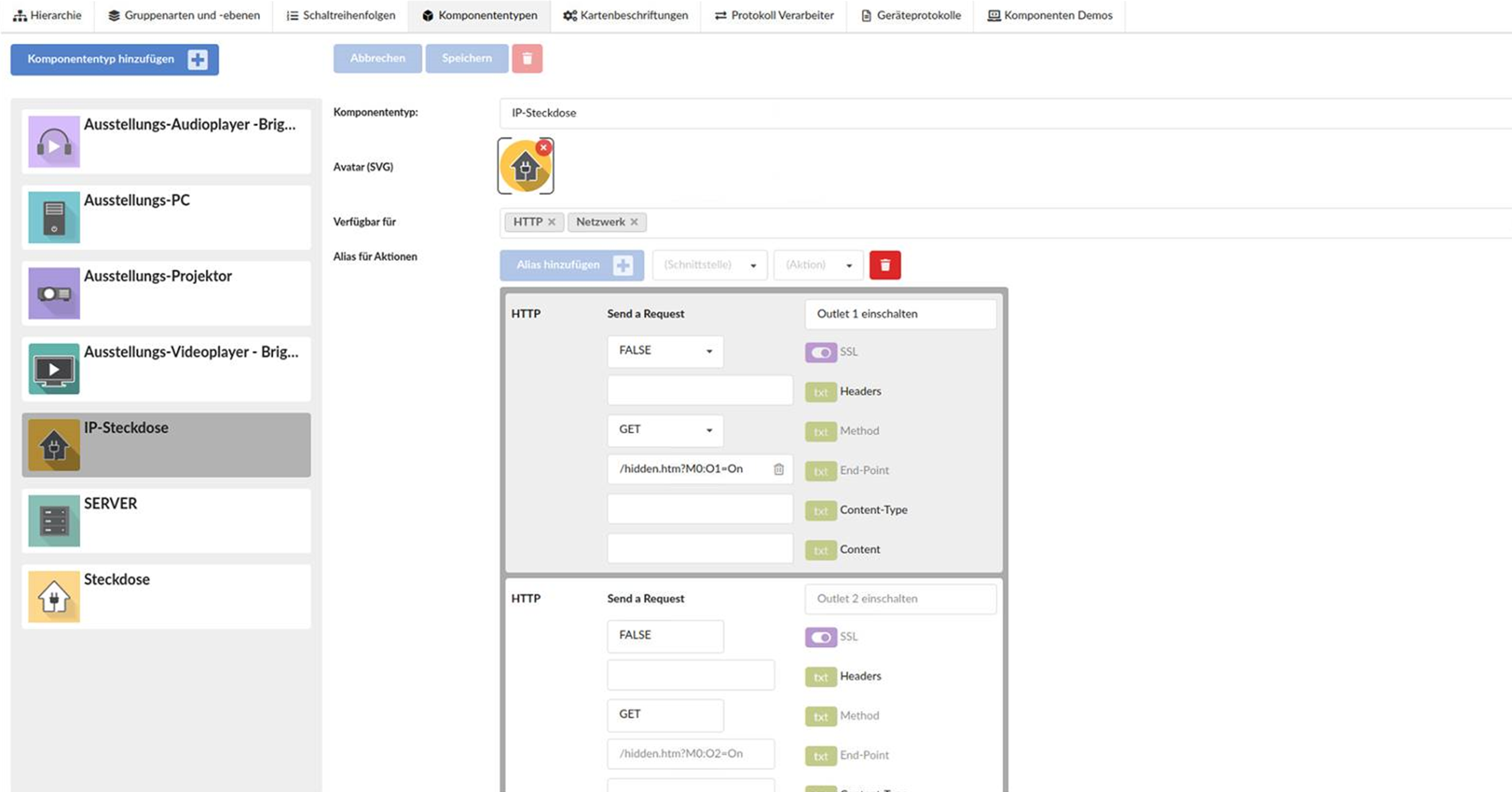
In this case, these are specific real IP sockets that can also be controlled via a web browser with commands such as: http://192.168.0.1/hidden.htm?M0:O1=On.
For installations using a custom CA certificate (corporate PKI), the path to the CA certificate file can be specified in the server configuration under tls.caFile, which is then used for HTTPS connections.
Provider Software API
The Provider Software API addresses PCs or software that can be controlled remotely using a protocol developed by Synergie (the so-called Software API).
Via this software API, which represents a type of generalization of the Exhibit API, the NeuroomNet server can be dynamically informed about available actions and events on the respective PC or software and can be controlled remotely accordingly.
- Classification: Passive
- Network / Communication: IP address
- Actions:
- [defined via the software API]
- Events:
- [defined via the software API]